What travels to the watch, and what does not
There are two separate things on your wrist and it is worth keeping them apart. One is the session itself, handed to Apple's own workout scheduler so the watch counts your intervals down for you. The other is a small Trainora app that shows today's plan and two numbers. Neither of them computes anything.
Sending a session, step by stepFrom there the session lives in the watch's own workout experience, scheduled through WorkoutKit: warm-up, intervals with their counts, recoveries, cool-down, counted down for you so that you are not doing arithmetic at threshold. Trainora does not run it and does not record it. Whatever the watch saves goes into Apple Health, and Trainora reads it back from there like any other session — which is the same path a Garmin or a Strava recording takes.
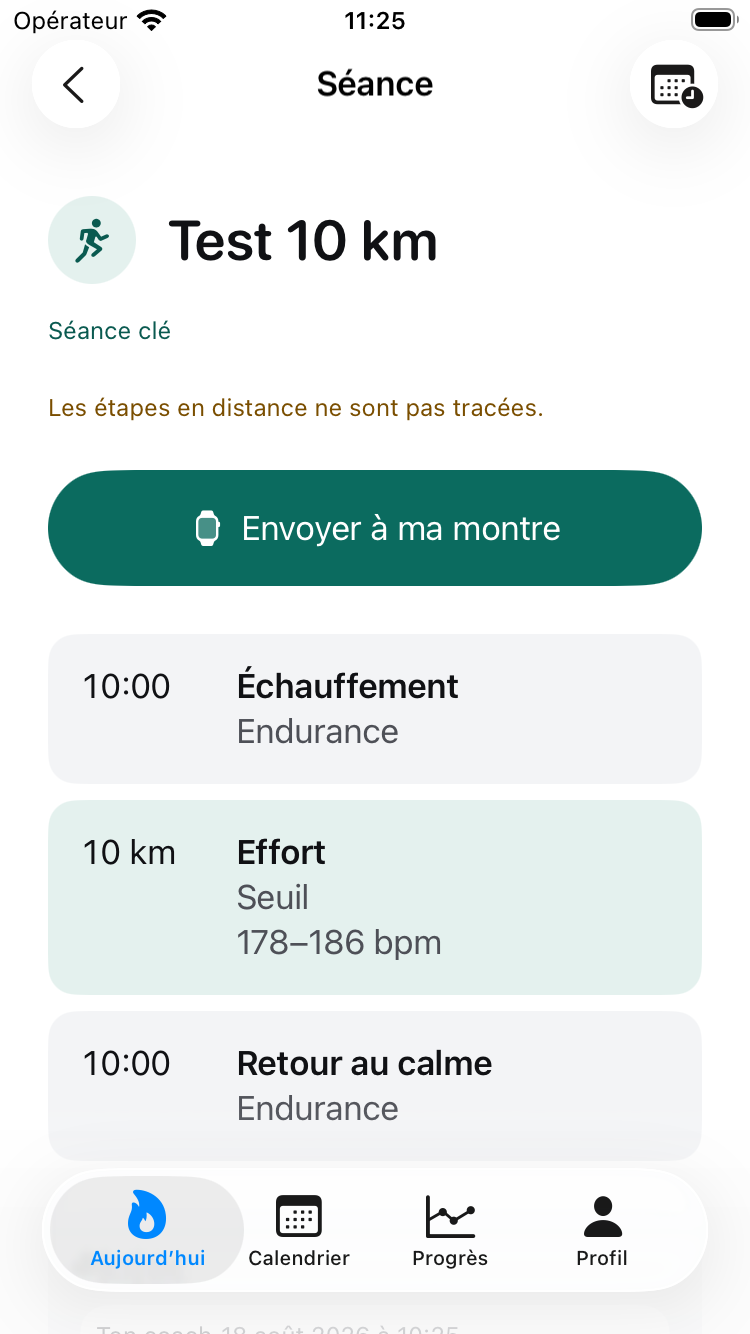
A Trainora prescription is a tree. 6 × (3 min hard / 2 min easy) stays legible as a repeat, and repeats can nest inside repeats. What the watch accepts is flat: one optional warm-up, a list of interval blocks each with a repetition count, one optional cool-down, and one alert per step. Almost everything difficult here comes from that mismatch.
The rule throughout is that whatever does not survive is counted and reported, never dropped in silence. A session whose pace targets quietly did not travel is worse than one that never arrived, because you set off believing the watch will tell you when you are off pace and it will not. These are the real messages, in the app's own words:
- “A watch shows one target per step, so only the first of each prescription travels.”
- Where a step carried several facets — a pace and a heart rate, say — one alert goes and the rest do not. The message names which was kept.
- “Zones without a written range are not sent — a watch uses its own zones, not ours.”
- The watch's zone numbers are derived from the wearer's own Health history, not from Trainora's five-zone model. Passing zone 4 straight through would put you in a different zone from the prescribed one, displayed with the authority of a number the app computed. Refusing to map it is the honest option; the fix is to prescribe the range, which you can.
- “Perceived effort has no equivalent on a watch.”
- Common on strength and pool sessions, where it is often the only target written.
- “Repeats inside repeats were unrolled — the session is identical, its shape is flatter.”
3 × (2 × (A/B))becomes one block ofA B A Brun three times. Same session, coarser shape.- “A warm-up or cool-down inside the session became an ordinary step.”
- There is exactly one slot for each, at each end. A second warm-up in the middle of a session still happens; it is just no longer labelled as one.
- “Your watch does not support one of the targets for this sport.” / “One step became open-ended: your watch does not support its goal.”
- Measured rather than assumed — a power alert on a swim genuinely comes back unsupported. An energy goal on a run is another. The step becomes open-ended rather than disappearing.
These are de-duplicated by kind rather than listed per step. A session of twelve intervals whose pace was dropped would otherwise produce twelve identical lines, which reads as twelve problems and buries the one that matters.
The watch app itselfOne screen. It shows what the phone last said about today: the session, its planned size, its dominant zone, whether it is the key session — or a rest card, or a plain statement that there is no plan yet and where a plan gets made, since nothing on the watch can create one.
Under that, at most two numbers: fitness and form. They arrive from the phone with the value already removed when the phone was not willing to state it, so nothing on the watch decides what is presentable. There is one confidence ladder and it lives on one side.
The last delivery is kept on the watch, so a session started on a morning run with the phone left at home still shows what was planned rather than a hand-off screen. But a snapshot only describes the day it was built for: past midnight it stops being old and starts being wrong, so it expires and the screen falls back to Open Trainora on your iPhone, with the timestamp of the last thing it heard — As of 18 Aug, 07:12 — rather than implying it is current.
What the watch app cannot do- Compute anything. Not a single figure on that screen is calculated there. An earlier version of this view rendered fabricated sample sessions as though they were yours, on a device where one big number reads as authoritative; that is precisely the failure this design exists to prevent. It renders what arrived, or it says nothing arrived.
- Create or edit a plan. No plan building, no session editing, no threshold entry. The no-plan screen says so and points at the phone.
- Record a workout. Recording is the watch's own workout app, or whatever else you use. Trainora reads the result back out of Apple Health.
- Reach the phone on demand. Delivery is by the phone's application context, which arrives when the watch comes back into range — not when you happen to open the app. There is no "refresh" that can force it.
- Be the whole product. It is a glance. Everything else is on the iPhone.
Everything above the scheduling call is verified by tests: the translation, every loss it can report, and the checks against the system's own support predicates — which are not politeness. Attaching an alert the watch refuses does not degrade gracefully; it stops the process dead. That was established by removing the check and watching a test process die rather than fail, which is why the check is there.
The handing-over itself needs a paired watch and cannot be verified on a development machine. It is also the step with no decisions in it. If a session does not arrive, the causes are almost always ordinary: the watch app not installed, the devices out of range, or scheduling permission refused.
Next: limitations — the page I would read first if I were deciding whether to trust this app.
Also in this notebook: the front page, the model, a week worked through, questions, the changelog, support, privacy and terms.
© 2026 Oshi Lab · contact@oshi-messenger.com